
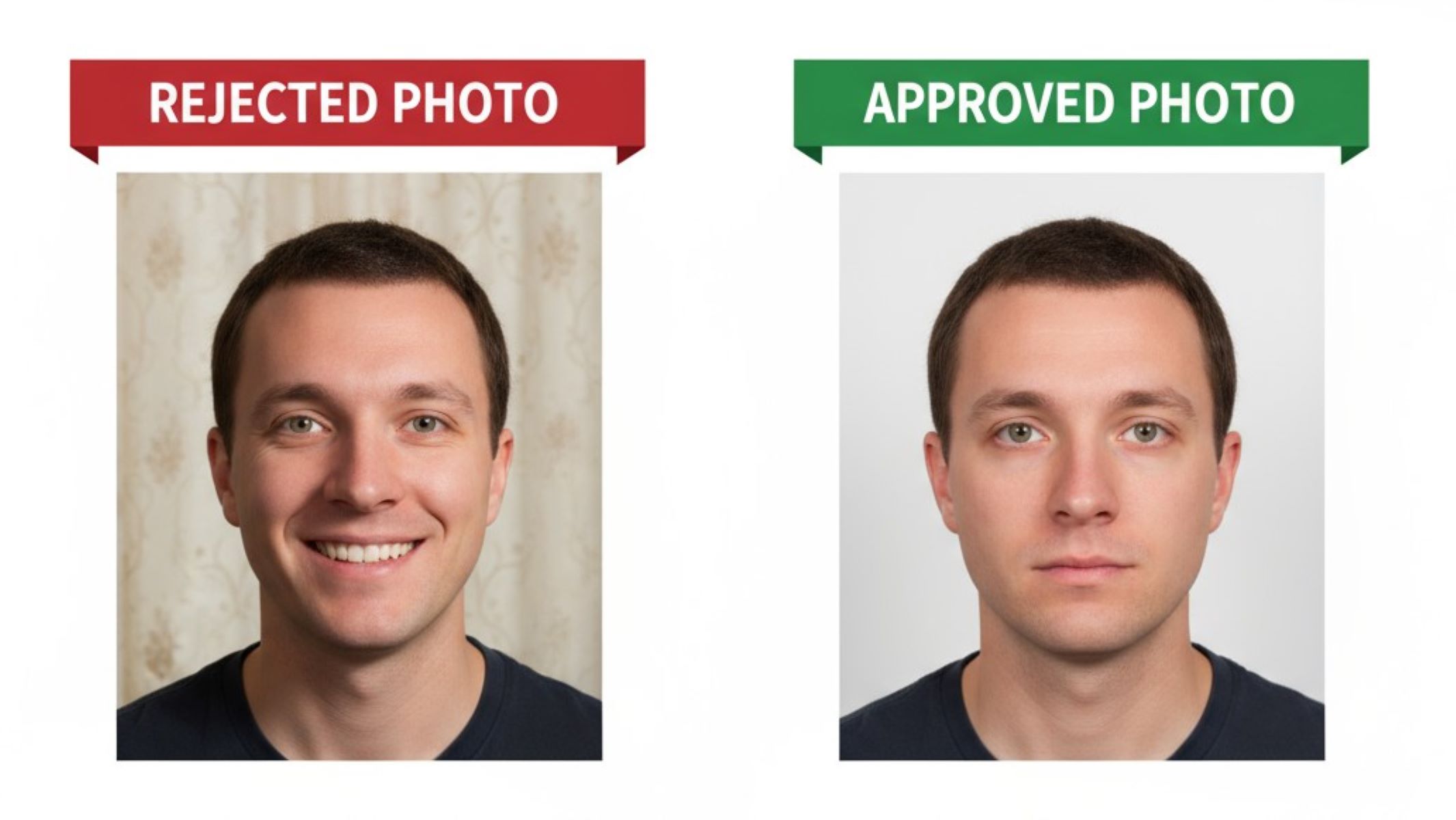
Common reasons U.S. passport photos get rejected (and how to avoid them)
Getting your passport should feel like an exciting step toward travel adventures, not a frustrating back-and-forth with rejected paperwork. Yet, believe it or not, thousands of U.S. passport applications are delayed every year simply because of photo issues. Something as small as a shadow behind your head or the wrong expression can derail the whole process. So, let’s break down the most common reasons U.S. passport photos get rejected—and, more importantly, how you can avoid these mistakes. Think of this as your ultimate guide to stress-free passport photo approval.
Why Passport Photos Matter More Than You Think
Your passport photo is far more than a simple snapshot; it serves as a critical part of your identity verification. Every time you travel internationally, this tiny image becomes a biometric reference that border officials, immigration authorities, and government agencies rely on to confirm that the person carrying the passport is indeed you. Unlike casual photographs you might post online, a passport photo must reflect your current appearance accurately, down to precise facial proportions, clear visibility of features, and proper lighting. Even minor discrepancies can cause confusion or suspicion during international travel, which is why the rules are so strict.
The U.S. Department of State enforces very specific regulations for passport photos to maintain a consistent standard. These rules cover everything from size, head position, and facial expression to background color, clothing, and eyewear. It may seem overly meticulous, but this uniformity ensures that passports from different applicants and different states can be quickly and reliably used as a secure form of identification. For instance, a consistent photo format allows facial recognition software at airports to function effectively and helps prevent identity fraud.
Security is the driving force behind these detailed requirements. If a photo does not meet the official standards, it isn’t just a minor inconvenience—it could be considered non-compliant with government regulations. A photo with shadows, glare, or improper head positioning might delay your application or trigger additional verification processes. This level of scrutiny is necessary because passports serve as one of the most trusted documents for international travel and identification, making every detail critical to maintaining their integrity.
Moreover, a proper passport photo can save you time, money, and stress. A rejected photo means resubmission, potential delays in receiving your passport, and possibly even missed travel plans. By understanding why these photos matter, you can appreciate the importance of adhering to guidelines. Think of your passport photo as your travel passport to smooth, hassle-free journeys—it’s the small but essential piece of documentation that stands between you and the world, and getting it right is non-negotiable.
The Basic U.S. Passport Photo Requirements
| Requirement | Description | Reason | Common Mistakes | Tips to Comply |
| Size | 2 x 2 inches (51 x 51 mm) | Standardized size for identification | Photos too large, too small, or improperly cropped | Use a ruler or professional passport service |
| Head Position | Centered, head height 1–1 3/8 inches (25–35 mm) | Ensures facial features are easily recognizable | Off-center, tilted, or too zoomed in/out | Align your head in the middle; measure head height |
| Background | Plain white or off-white, no patterns or textures | Eliminates distractions, helps facial clarity | Shadows, patterns, colored walls | Stand 2 feet from the wall; use even lighting |
| Expression | Neutral or natural smile, eyes open | Allows accurate identification | Smiling with teeth, frowning, squinting | Keep lips closed, look directly at the camera |
| Quality | High resolution, no blurriness, no pixelation | Ensures features are clearly visible | Grainy, low-resolution, or distorted photos | Use 300 dpi resolution, proper lighting |
| Glasses | Not allowed since 2016 (unless with medical statement) | Prevents glare and facial obstruction | Wearing glasses, reflections on lenses | Remove glasses or provide doctor’s note |
| Attire | No uniforms, camouflage, or hats (unless for religious/medical reasons) | Avoids impersonation and maintains neutrality | Wearing military clothing, bright patterns, hats | Wear plain, neutral clothing; remove hats if possible |
Top Reasons U.S. Passport Photos Get Rejected
Getting a U.S. passport photo rejected is more common than you might think, and it usually happens because of small, avoidable mistakes. Here’s a detailed list of the most frequent reasons your photo might not make the cut:
- Wrong Photo Size – Many applicants submit photos that aren’t the required 2×2 inches (51 x 51 mm). Even a tiny deviation can trigger rejection. Incorrect sizing disrupts standardization, making it difficult for border officials to verify identities.
- Incorrect Head Size or Position – Your head must take up the proper proportion of the photo, ideally 1 to 1 3/8 inches from chin to crown. Off-center heads, heads too large or too small, or uneven positioning are common causes of rejection.
- Shadows in the Background – Even faint shadows behind your head or shoulders can cause issues. Shadows obscure features, reduce clarity, and make the photo non-compliant.
- Wrong Facial Expression – Passport photos require a neutral expression or a natural, closed-mouth smile. Overly wide smiles, teeth showing, frowning, or squinting will usually lead to rejection.
- Wearing Glasses – Since 2016, glasses are prohibited unless you have a signed medical exception. Reflections, glare, or partially hidden eyes are unacceptable.
- Poor Lighting or Low Image Quality – Photos that are too dark, grainy, blurry, or pixelated will not meet the Department of State standards. Clear, sharp, and evenly lit images are required.
- Wrong Background Color – The background must be plain white or off-white with no textures, patterns, or objects visible. Colored walls, furniture, or clutter behind you can cause rejection.
- Improper Clothing or Attire – Uniforms, camouflage, and military-style clothing are prohibited. Bright patterns or clothing that looks like official attire can be rejected for security reasons.
- Head Coverings Without Justification – Religious or medical head coverings are allowed only if they do not obscure the face. Fashion or style-related coverings are not acceptable.
- Hair Covering the Face or Eyes – Bangs, long hair, or anything obstructing your eyes or eyebrows can lead to rejection. Both eyes must be fully visible.
- Children’s or Baby Photos Done Incorrectly – Common mistakes include hands holding the child, toys visible in the frame, or eyes closed in infants. Even with some leniency, proper alignment and clear visibility are required.
- Photos Older Than Six Months – A photo that does not reflect your current appearance can be rejected. Significant changes in hairstyle, facial hair, or weight may necessitate a new photo.
- Excessive Digital Editing – Over-retouched photos, airbrushing, or filters distort facial features and are not acceptable. Only minor brightness or cropping adjustments are allowed.
- Incorrect File Format or Printing – Low-resolution prints, wrong file types (non-JPEG), ink smudges, or pixelation can all cause a photo to be non-compliant.
- Submitting a Selfie – Selfies often produce distorted proportions and uneven lighting, which makes them unsuitable for official passport use.
Poor Lighting or Low Quality
One of the most common reasons passport photos get rejected is poor lighting or low image quality. A dark, grainy, or pixelated photo simply does not meet the U.S. Department of State’s standards because it fails to clearly display your facial features. Passport photos are meant to serve as a reliable biometric identifier, and any visual distortion can interfere with identification. Even slight shadows across your face, uneven lighting, or low-resolution images can render a photo unacceptable.
Lighting plays a critical role in ensuring that every facial detail is visible. Overhead lighting can cast unwanted shadows under your eyes or chin, while lighting from only one side may create uneven highlights and dark spots. The ideal setup involves bright, even lighting from multiple directions to eliminate shadows and create a natural, balanced appearance. Natural daylight is excellent if it’s diffuse and indirect, but lamps with soft, white bulbs positioned on either side of the subject work just as well.
The resolution of the image is equally important. Low-resolution photos can appear blurry or pixelated when printed, which prevents passport officers from verifying features accurately. Setting your camera or smartphone to the highest resolution available—at least 300 dpi—is crucial. Professional photo services typically provide this automatically, but if you’re taking the photo yourself, checking your device’s settings before shooting can save a lot of trouble.
Finally, resist the temptation to use filters, beauty modes, or digital enhancements. These may look flattering on social media, but they alter facial features or colors in ways that make the photo non-compliant. Even subtle adjustments to skin tone or contrast can lead to rejection. The goal is a natural, clear representation of your face—nothing more, nothing less. Proper lighting, high resolution, and minimal editing together ensure your passport photo meets official standards and avoids unnecessary delays.
Wrong Background Color
| Requirement | Description | Reason | Common Mistakes | Tips to Comply |
| Background Color | Must be plain white or off-white | Ensures facial features are clearly visible | Colored walls, patterned wallpaper, or clutter | Stand against a clean white or off-white wall |
| No Patterns or Textures | Background should be smooth, uniform, and plain | Prevents distractions and ensures biometric accuracy | Textured walls, curtains, or furniture visible | Use a blank wall or backdrop |
| No Objects in Frame | Only the subject should be visible | Maintains focus on facial features for ID checks | Chairs, plants, or other objects in background | Clear area behind you before taking the photo |
| Even Lighting | Background should be evenly lit with no shadows | Avoids shadows that interfere with facial recognition | Shadows from lamps, windows, or body parts | Use diffuse lighting from multiple angles |
| Editing Rules | Background may be digitally adjusted if needed | Corrects minor inconsistencies | Over-editing, visible marks, or unnatural edges | Use professional software carefully |
Wearing Uniforms or Camouflage
Wearing uniforms, camouflage, or clothing that resembles official attire is one of the less obvious but very common reasons U.S. passport photos get rejected. The purpose of this rule is to maintain neutrality and prevent confusion with law enforcement, military, or government personnel. Passport photos are meant to be standardized representations of the individual, and clothing that appears official can compromise this consistency.
- Military or Service Uniforms – Any military uniform, police attire, or service-related clothing is strictly prohibited. These can give the appearance of impersonation or official authority.
- Camouflage Patterns – Camouflage clothing, whether military or fashion-based, is not acceptable because it distracts from the facial features and can interfere with biometric recognition.
- Bright or Reflective Clothing – Shiny fabrics, metallic threads, or neon colors may reflect light and create shadows or glare on your face, affecting the clarity of the photo.
- Clothing Resembling Official Attire – This includes clothing with badges, insignias, epaulettes, or logos that may be associated with governmental or official organizations.
- High-Contrast or Distracting Patterns – Stripes, checks, or other busy patterns can draw attention away from your face, making it harder for passport officers to evaluate your features.
- Formal or Costume Clothing – While not always rejected, overly formal attire (like tuxedos or ceremonial costumes) may be flagged if it appears inconsistent with standard passport guidelines.
- Accessories Resembling Uniform Elements – Hats, ties, scarves, or other accessories that mimic uniform parts can also be problematic.
- Neutral, Everyday Clothing Recommended – Solid, neutral colors such as blue, gray, or white are ideal because they keep focus on your face and comply with regulations.
- Avoid Overly Fashionable Styles That Distract – Clothes with large prints, logos, or exaggerated styles may unintentionally make your photo non-compliant.
- Check for Unintentional Similarities – Before taking your photo, step back and assess whether your outfit could be mistaken for a uniform or official attire. If in doubt, switch to simpler clothing.